From Typebars to Touchscreens: The History of the Keyboard
The keyboard under your fingers wasn't invented in a single moment. It evolved over more than 150 years: from metal levers hammering an inked ribbon, to electric typeballs, to computer scan codes, to a dictionary hidden behind nine phone keys, to sheets of glass that guess your next word. Some decisions made in a Milwaukee workshop in the 1870s still decide where your fingers rest today.
Here is how we got from there to here, one era at a time, and where typing may be heading next.
Who invented the keyboard?
The first commercially successful typewriter keyboard came from Christopher Latham Sholes, a Milwaukee printer and newspaper editor, working with Carlos Glidden and Samuel W. Soule. The three filed their first typewriter patent in 1868, and Sholes spent the next five years refining the machine.
Their early prototypes had keys in alphabetical order, laid out much like a piano. That created a mechanical problem. Each key drove a metal arm, called a typebar, that swung up to strike the paper. When a typist hit two neighboring typebars in quick succession, they could collide and jam.
Sholes rearranged the letters by trial and error. By 1873, when the gun and sewing-machine maker E. Remington & Sons agreed to manufacture the machine, the layout was close to the one we still use. The Sholes & Glidden Type-Writer went on sale in 1874, and a refined version of the QWERTY arrangement was patented in 1878.
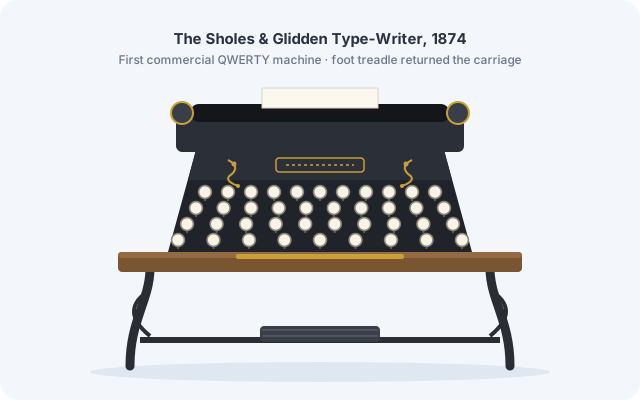
No. It's one of the most repeated stories in tech history, but the aim was to stop typebars jamming so people could type faster. Researchers Koichi and Motoko Yasuoka of Kyoto University later added a second explanation: early machines were tested by telegraph operators transcribing Morse code, and their needs shaped where letters landed. In American Morse, the letter Z and the pair "SE" sound almost identical, which helps explain why S, E and Z ended up close together.
Era 1: Mechanical typewriters (1870s–1950s)
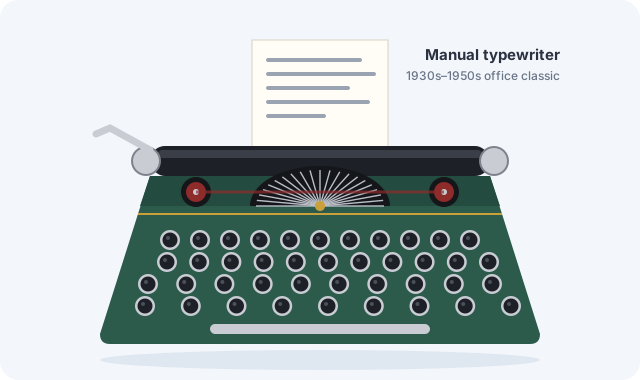
On a mechanical typewriter, your finger supplied all the energy. The key pushed a lever, the lever swung a typebar, and the typebar slammed an inked ribbon against the paper. Press harder and the letter came out darker.
The next big step came in 1878, when Remington's second model introduced the Shift key. Before that, machines printed capitals only. Now each typebar carried two characters, and pressing Shift physically moved the mechanism so the capital struck the paper instead. The words for the two forms are even older: printers kept capital letters in the upper case of their type drawers and small letters in the lower case.
That 1878 key still causes daily headaches. If you've ever left Caps Lock on and typed a whole paragraph in capitals, our Case Converter fixes it in one click instead of a retype.
Era 2: Electric typewriters and teleprinters (1930s–1960s)
Electric typewriters took the effort out of each stroke. The key only had to close a switch, and a motor delivered the blow, so every letter landed with the same force. Pages looked cleaner and typists tired less. IBM entered the market in 1933 by buying the Electromatic Typewriter company.
Meanwhile, teleprinters (also called teletypewriters) connected keyboards to telegraph lines. A keystroke became an electrical code sent down a wire and printed somewhere else entirely. This was the moment typing turned into data, the same idea as Morse code but automated. You can still play with the original version in our Morse Code Converter.
In 1961, the IBM Selectric did away with the basket of typebars altogether. A single golf-ball-sized element, the "typeball", rotated and tilted to strike each character. With no typebars left, nothing could jam, and you could switch fonts in seconds by swapping the ball.
Era 3: Computer keyboards (1960s–present)
Once keyboards were wired to computers, keys stopped making marks at all. Early computer users typed on teleprinters such as the Teletype Model 33 (1963), which printed everything on a roll of paper. Video terminals such as DEC's VT100 (1978) put the text on a screen instead.
Modern keyboards don't send letters. They send a scan code that says which physical key was pressed, and your computer turns it into a character using your language settings. That's why the same keyboard can type on a US, French AZERTY or Spanish layout just by changing a setting.
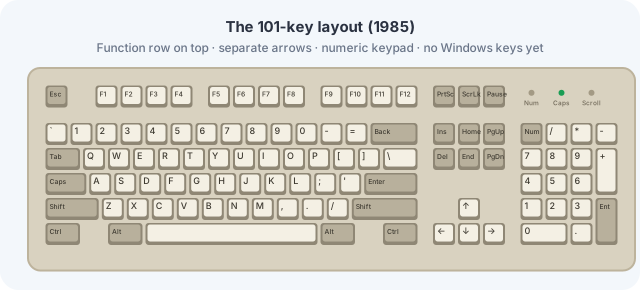
In 1985, IBM introduced the Model M. Its 101-key layout became the template almost every desktop keyboard still follows: F1–F12 function keys along the top, an inverted-T block of arrow keys, and a numeric keypad on the right. Its buckling-spring switches gave a crisp, tactile click, and many Model Ms are still in daily use four decades later. The Windows and Menu keys arrived in the mid-1990s with Windows 95, giving us today's 104-key layout.
Era 4: Phone keypads and T9 (1990s–2000s)
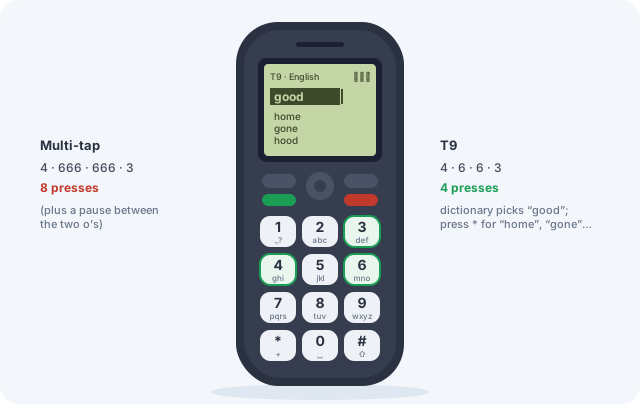
Mobile phones squeezed the alphabet back onto 12 keys. The letters were spread across the number keys 2 to 9, so typing meant multi-tap: press 5 once for J, twice for K, three times for L. A short text message could take well over a hundred presses.
T9, short for "Text on 9 keys", changed that. It was developed by Martin King and Cliff Kushler, whose company Tegic Communications was founded in 1995. The idea came from King's earlier work on an eye-tracking communication device for people with disabilities, which needed to turn a handful of inputs into whole words. With T9 you press each key only once, and a built-in dictionary works out which word you meant.
Take the sequence 4-6-6-3. It could spell good, home, gone or hood. T9 shows the most likely word first, and one key cycles through the others. Words that share a number sequence like this are sometimes called "textonyms".
Want to see how your own words look on a keypad? Our T9 Converter turns any text into its number sequence and decodes sequences back into words.
Era 5: Touchscreens and virtual keyboards (2007–present)
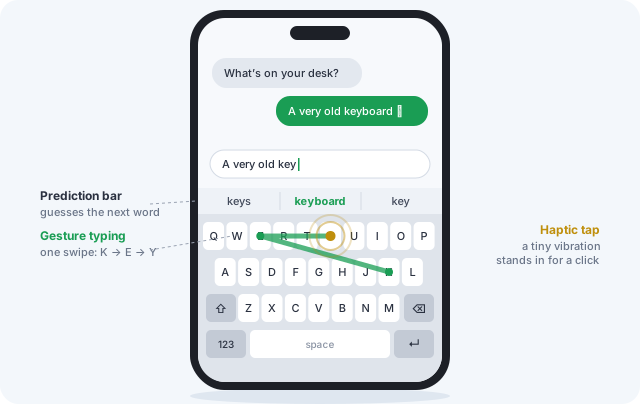
When the iPhone launched in 2007 without a physical keyboard, plenty of people doubted they could type on glass. Software made it work. Auto-correct fixes near-misses, a prediction bar offers whole words, and many virtual keyboards quietly enlarge the touch area of the letters you are most likely to type next.
Gesture typing went further. Instead of tapping, you slide one finger from letter to letter, and the software matches the shape of the path to a word. One of the best-known versions, Swype, was co-created by Cliff Kushler, the same inventor behind T9. Meanwhile, tiny haptic motors give a short vibration on each tap to stand in for the click of a real key.
The keyboard timeline at a glance
| Year | Milestone |
|---|---|
| 1868 | Sholes, Glidden and Soule file their first typewriter patent |
| 1873 | E. Remington & Sons agrees to manufacture the machine |
| 1874 | The Sholes & Glidden Type-Writer goes on sale with a QWERTY layout |
| 1878 | Remington's second model adds the Shift key; the QWERTY layout is patented |
| 1933 | IBM enters the electric typewriter business |
| 1961 | The IBM Selectric replaces typebars with a rotating typeball |
| 1963 | The Teletype Model 33 becomes a common computer terminal |
| 1978 | DEC's VT100 video terminal puts typed text on a screen |
| 1985 | The IBM Model M sets the 101-key standard |
| 1995 | Tegic Communications is founded and T9 follows; Windows 95 brings the Windows key |
| 2007 | The iPhone popularises the full touchscreen keyboard |
What is the future of the keyboard?
Physical and on-screen keyboards are close to the limits of how fast fingers can move, so the next changes are about new kinds of input rather than better keys.
- Voice and AI assistants. Fast, accurate speech recognition combined with AI writing tools turns typing from letter-by-letter transcription into describing what you want and editing the draft.
- Neural and muscle interfaces. Implanted brain-computer interfaces, such as Neuralink's, read signals from the brain's motor cortex; trial participants have moved cursors and typed without touching anything. Non-invasive wristbands take a gentler route, using electromyography (EMG) to read muscle signals at the wrist, so tiny finger movements become input.
- Spatial and eye-tracking input. Augmented-reality glasses and headsets let you type with a pinch of your fingers, on keys floating in the air, or simply by looking at a letter. Eye typing brings the story full circle: T9 itself grew out of an eye-tracking device.
Will QWERTY ever disappear?
Probably not soon. Alternative layouts exist, most famously Dvorak, patented in 1936, but none has displaced QWERTY. Billions of people already know it, every device ships with it, and switching costs more effort than most people will spend. It's a textbook example of a standard that locks itself in. The machines changed completely; the letter order Sholes settled on in the 1870s stayed.
Type like it's 2003
Turn any message into old-school keypad numbers, or decode a T9 sequence back into words. It's free and runs entirely in your browser.
Open the T9 Converter →Frequently asked questions
Who invented the computer keyboard?
No single person. The layout comes from Christopher Latham Sholes's typewriter of the 1870s. Teleprinters connected keyboards to wires, and computer makers such as IBM and DEC adapted them for terminals and PCs. The IBM Model M of 1985 set the layout most desktop keyboards still use.
Why are keyboards QWERTY instead of ABC?
The alphabetical layout on early typewriters let neighboring typebars collide and jam. Sholes rearranged the letters to reduce jams, influenced by the telegraph operators who tested the machine. QWERTY then became the standard simply because everyone learned it.
When was the Shift key invented?
In 1878, on Remington's second typewriter model. It let each typebar carry both a capital and a small letter.
What does T9 stand for, and who invented it?
T9 means "Text on 9 keys". It was developed by Martin King and Cliff Kushler of Tegic Communications, founded in 1995, and let mobile users type each letter with a single key press instead of multi-tap.